Why Apple’s M5 Ultra Mac Studio Could Transform Local LLMs
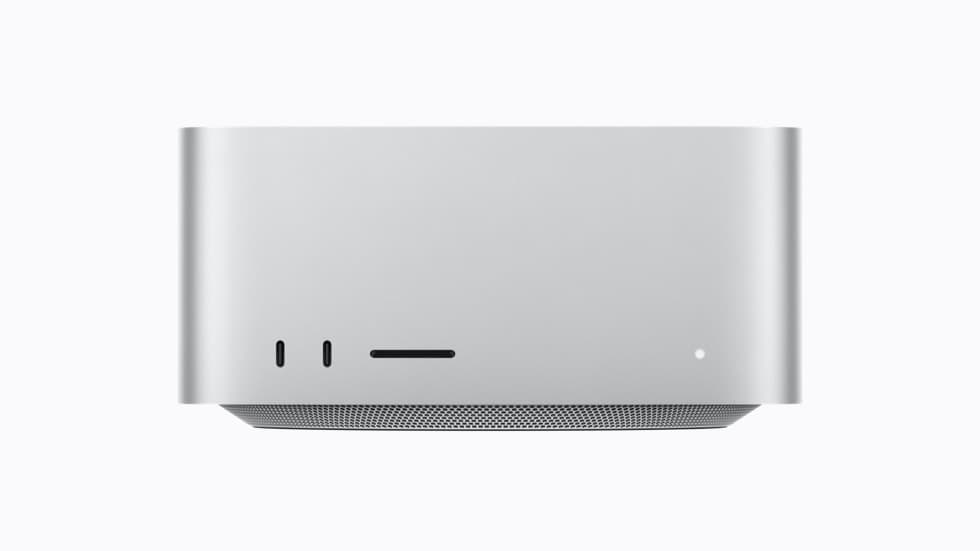
Apple has introduced a new Mac Studio powered by the M5 Max and M5 Ultra, and the headline specification is difficult to ignore: up to 512GB of unified memory with 1.2TB/s of memory bandwidth.
This is not a new Mac mini, despite the similar compact-desktop appearance. It is Apple’s much more powerful Mac Studio. But the excitement around it is connected to what we have already seen with the Mac mini: developers have increasingly used small, quiet Apple silicon computers as always-on machines for local AI tools, coding agents, home automation, and projects such as OpenClaw.
The Mac mini helped validate the idea of a personal AI server. The M5 Ultra Mac Studio now pushes that idea into a very different performance class.
What Apple announced
According to Apple’s announcement, the new Mac Studio is available with two chip families:
| Specification | M5 Max | M5 Ultra |
|---|---|---|
| CPU | 18 cores | Up to 36 cores |
| GPU | Up to 40 cores | Up to 80 cores |
| Unified memory | Up to 128GB | Up to 512GB |
| Memory bandwidth | Up to 614GB/s | Up to 1.2TB/s |
| Starting US price | $2,499 | $5,499 |
Apple says the M5 Ultra delivers up to 4.3 times the peak AI compute performance of the M3 Ultra and up to four times faster LLM prompt processing in LM Studio than the previous M3 Ultra generation. Those are Apple’s own benchmark claims and will need independent testing across different models, quantization formats, context sizes, and inference engines.
The M5 Ultra version also introduces Neural Accelerators in its GPU cores, PCIe Gen 6-based internal storage, Thunderbolt 5, Wi-Fi 7, and Bluetooth 6. Apple says configurations with 512GB of memory will arrive later in October 2026.
Why unified memory matters for local LLMs
Most conventional computers split memory into separate pools. The CPU uses system RAM, while a discrete GPU uses its own VRAM. A model that must run on the GPU is therefore limited primarily by the amount of VRAM installed on the graphics card.
Apple silicon uses a unified memory architecture. The CPU, GPU, and Neural Engine can work with the same large memory pool without maintaining entirely separate copies of the same data.
For local AI, this creates a major practical advantage: the machine can load models far larger than those that fit on a typical 16GB or 24GB consumer GPU.
A rough estimate for model weights alone is:
Memory for weights ≈ parameter count × bits per parameter ÷ 8That means a 70-billion-parameter model quantized to four bits may require roughly 35GB just for its weights. Actual runtime memory will be higher because the inference engine also needs space for metadata, computation, the key-value cache, and the operating system.
Likewise, a 400-billion-parameter model at four bits might require around 200GB for weights before runtime overhead. A 512GB unified-memory configuration therefore opens the door to enormous quantized open-weight models, long contexts, mixtures of models, and complex local workflows that are simply impossible on most personal workstations.
Fitting a model into memory, however, does not guarantee that it will run quickly.
Capacity and speed are different questions
The new Mac Studio’s memory capacity is extraordinary, but local LLM performance depends on more than capacity:
- ◆Memory bandwidth
- ◆Model architecture
- ◆Quantization format
- ◆Prompt and context length
- ◆Inference framework
- ◆GPU utilization
- ◆Number of concurrent users
- ◆Prompt-processing versus token-generation speed
The M5 Ultra’s 1.2TB/s of memory bandwidth is therefore just as important as its 512GB capacity. Autoregressive LLM generation is often heavily constrained by how quickly model weights can move through memory.
Even so, NVIDIA GPUs may remain faster for many workloads because of mature CUDA tooling, optimized kernels, broad framework support, and substantially higher compute in dedicated multi-GPU systems. Apple’s advantage is different: a single quiet desktop can offer a remarkably large, directly accessible memory pool without assembling a server full of expensive accelerator cards.
The Mac Studio is not automatically the best AI computer for every workload. It may, however, become one of the most accessible ways to run unusually large models locally.
How the Mac mini prepared the market
The Mac mini became popular as an always-on AI and automation box for understandable reasons:
- ◆Compact and quiet
- ◆Relatively low power consumption
- ◆Reliable enough to run continuously
- ◆Native macOS features and integrations
- ◆Easy remote administration
- ◆Apple silicon support in popular local-AI applications
Projects such as OpenClaw reinforced that trend. OpenClaw runs on a user’s own device, connects models with tools and messaging channels, and can operate through a persistent gateway. Its documentation even describes the Mac mini as a popular always-on host.
But there is a crucial distinction: hosting an AI agent is not the same as hosting the AI model.
OpenClaw itself can connect to cloud models, subscription-backed providers, or a separate local model server. Running the gateway and automation tools may not require an expensive computer. Running a large, capable LLM entirely on the same machine is the resource-intensive part.
This is why an affordable Mac mini can be an excellent agent host while a high-memory Mac Studio is a potential local inference workstation.
What the new Mac Studio could enable
1. Large private coding models
Companies could run capable coding assistants against sensitive repositories without sending source code to an external inference API. Local deployment can improve data control, although organizations still need authentication, logging, sandboxing, and careful tool permissions.
2. Always-on local AI agents
An agent such as OpenClaw could use a locally hosted model, local files, and approved tools from the same system. This may reduce dependence on external APIs and allow operation during Internet outages.
It does not make autonomous agents automatically safe. An always-on agent with file, terminal, browser, email, or messaging permissions can cause real damage if it follows malicious instructions. Isolation, limited credentials, approval gates, backups, and audit logs remain essential.
3. Multi-model workflows
With hundreds of gigabytes available, developers may be able to keep multiple specialized models available—for example, a main reasoning model, a coding model, an embedding model, and a vision model—without constantly unloading and reloading everything.
4. Local research and prototyping
Researchers and startups could experiment with large open-weight models, quantization, fine-tuning methods, retrieval systems, and agent architectures without paying for every token sent to a cloud API.
This does not mean the Mac Studio replaces large training clusters. Full training of frontier-scale models still requires enormous distributed compute. The realistic opportunity is local inference, evaluation, development, and selected fine-tuning workloads.
5. Private media and document processing
The machine could support workflows that combine local speech recognition, vision-language models, image generation, document analysis, and LLM reasoning while keeping customer or company data on the device.
MLX could be a major part of the story
Apple’s open-source MLX framework is designed specifically for machine learning on Apple silicon. Its unified-memory model allows arrays to be used across supported CPU and GPU operations without explicit transfers between separate memory pools.
The companion MLX LM project provides tools for generating text, quantizing models, and fine-tuning language models on Apple silicon. Other user-friendly applications, including LM Studio and local model servers, can make local inference accessible without requiring every user to build a Python stack manually.
Hardware alone will not decide whether the new Mac Studio becomes a local-AI success. Framework optimization, model support, quantization quality, prompt-processing speed, and application compatibility will matter just as much.
Could multiple Mac Studios become one AI system?
Apple says Thunderbolt 5 and RDMA support allow multiple new Mac Studio systems to be clustered, creating a shared memory pool for distributed inference. The company claims a four-system cluster can deliver up to three times the AI inference performance of one system.
That is technically fascinating. Four fully configured machines could expose an extraordinary amount of aggregate memory for very large open-weight models.
However, buyers should wait for independent benchmarks. Distributed inference introduces communication overhead, software requirements, model-partitioning challenges, and rapidly increasing hardware cost. A cluster may be attractive to research teams and specialized businesses, but it is unlikely to be the sensible starting point for an individual developer.
The limitations should not be ignored
Price
The M5 Ultra model starts at $5,499 in the United States, and the 512GB configuration will cost substantially more. This is professional equipment, not a budget replacement for cloud AI.
Memory is not upgradeable
Unified memory is selected at purchase and cannot be upgraded later. Buyers need to estimate their model sizes and future requirements carefully.
Apple is not CUDA
Many machine-learning projects still prioritize NVIDIA and CUDA. Some tools may not support Metal or MLX fully, and a workflow that runs perfectly on Linux with CUDA may require changes or may not run efficiently on macOS.
Local AI still has operating costs
There may be no per-token API bill, but the owner still pays for hardware, electricity, storage, backups, maintenance, and engineering time. A cloud API can remain cheaper for occasional use.
Privacy requires more than local execution
A model running locally does not guarantee privacy if the surrounding application sends telemetry, uses cloud embeddings, installs unsafe extensions, or grants excessive permissions to an autonomous agent.
Mac mini or Mac Studio for local AI?
The right choice depends on the job.
Choose a Mac mini when you want:
- ◆An affordable always-on automation host
- ◆OpenClaw or another agent using cloud APIs
- ◆Smaller local models
- ◆Home-lab services and lightweight development
- ◆Low power usage and a small footprint
Consider the new Mac Studio when you need:
- ◆Large models that require far more memory
- ◆Higher local inference throughput
- ◆Large context windows
- ◆Several AI models or services at once
- ◆Professional media and AI workloads on one machine
- ◆A private team inference server
- ◆MLX development and fine-tuning experiments
For many people, a Mac mini paired with a good hosted model will remain the better value. The Mac Studio becomes compelling when privacy, model size, predictable heavy utilization, or offline operation justifies the upfront cost.
Is this a turning point for local AI?
Potentially—but not simply because Apple has put 512GB of memory in a compact computer.
The more important shift is that local AI is becoming a serious product category rather than a hobbyist workaround. Apple is now explicitly positioning the Mac Studio for enormous on-device LLMs, coding agents, image generation, local training workflows, and clustered inference. At the same time, tools such as MLX, MLX LM, LM Studio, Ollama, and OpenClaw are making local and self-hosted AI easier to use.
The Mac mini showed that people want personal, always-on AI infrastructure. The new M5 Ultra Mac Studio shows what happens when that same compact-computer idea gains workstation-class compute, up to 512GB of unified memory, and enormous memory bandwidth.
It may not “change the world” overnight. But it could change what developers, researchers, and small teams expect to run privately on a desk—and that is a very significant step.
Specifications, prices, performance claims, and availability in this article are based on Apple’s August 25, 2026 announcement. Independent real-world benchmarks were not yet available when this article was written.

Software Engineer · AWS · DevOps · Platform & AI Infrastructure. Specializing in cloud infrastructure, AWS CDK, VoIP platforms, and full-stack systems.